
Create a listing with an Airbnb Limited connection
The Limited connection lets you import an existing Airbnb listing into Your.Rentals so you don't have to set it up from scratch. This is a one-way import: once your listing is created in YR, it becomes independent from Airbnb, so any future updates need to be made in both places.
Before you start
Make sure you're logged in to the Airbnb account that holds the listing you want to import. This ensures YR connects to the correct account.
Steps
- Log in to Your.Rentals.
- Go to Listings in the top navigation bar.
- Click Add new listing.
- Select Copy from another website, then choose to connect your Airbnb account.
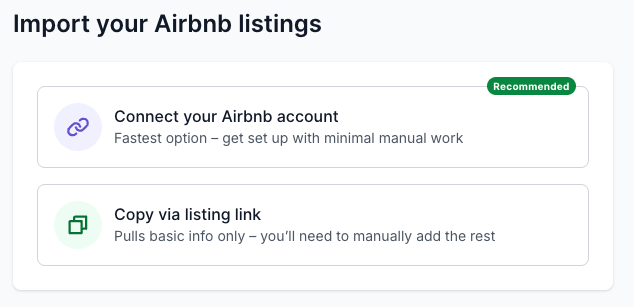
- You’ll be redirected to Airbnb’s authorization screen. Review and confirm the permissions YR requests.
- Back in YR, choose the listing you want to import from your Airbnb account.
- Click Import.
- Review and finalize your listing details in YR: Description, photos, pricing, and availability, and more.
- Don’t forget to set up a two-way sync with your Airbnb calendar via iCal to avoid double bookings.
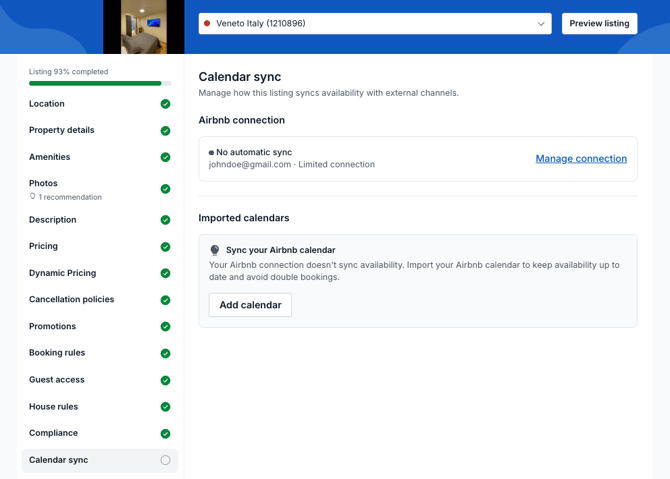
- Publish your listing to your selected Sales Channels (for example, Booking.com or Vrbo).
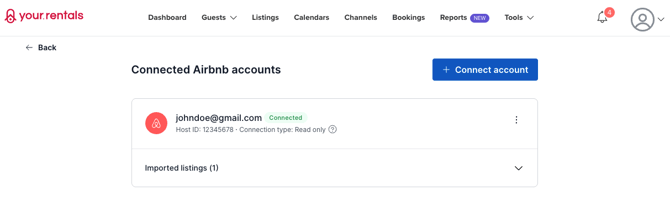
- Once you've connected your first Airbnb account, you can return to the connections page (Listings → Add new listing → Copy from another website) to import additional listings or connect another Airbnb account.
Good to know
Because this is a Limited connection, future changes on Airbnb won't be reflected in YR, and changes you make in YR won't be updated on Airbnb. If you want complete synchronization between YR and Airbnb, consider using a Full connection instead (coming soon).