
The Instructions box in AI settings is where you tell the AI how to write on your behalf. It applies to every draft, on every listing. You don't need to be technical and you don't need to get it perfect. A few clear lines is enough, and you can edit them any time.
In this article, you'll learn what to write and how to write it so the AI sounds like you.
Use the Instructions box to cover things the AI can't guess on its own, for example:
- how you introduce yourself,
- how to address the guest,
- whether to say "we" or "I",
- how to react when a guest reports a problem,
- and how to sign off.
Three things that make instructions work
-
Be specific
-
The AI does best with concrete direction. Vague instructions give vague replies.
-
-
Set your sign-off in full
-
By default the AI adds no sign-off at all, so if you want one, this box is the only place to set it. Write it out exactly as you want it to appear, with your real name or business name. You can also tell it to say "we" or "I" (it uses "I" by default).
-
-
Write it once, then refine
-
Save your first version, then read the next few drafts the AI produces. If something is off, add one line to fix it. Small, specific additions work better than rewriting everything.
-
Starter instructions you can paste in
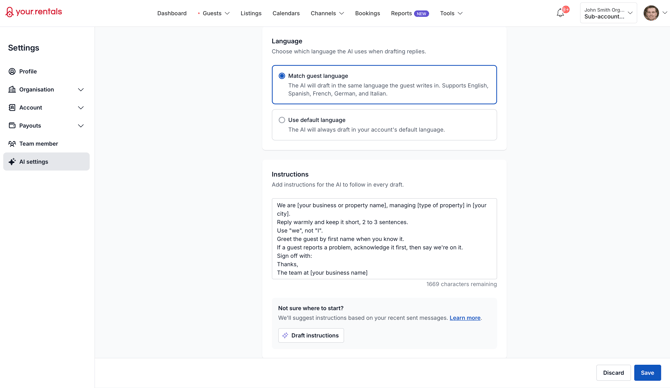
This is an example starter, not a fixed rule. Paste it into the Instructions box as a starting point, then edit the parts in brackets:
We are [your business or property name], managing [type of property] in [your city].
Reply warmly and keep it short, 2 to 3 sentences.
Use "we", not "I".
Greet the guest by first name when you know it.
If a guest reports a problem, acknowledge it first, then say we're on it.
Sign off with:
Thanks,
The team at [your business name]
The text in brackets is a placeholder for you to fill in. Replace it with your own words — your business name, your city, and so on — before you save. For example, [your city] becomes London.
If you're a solo host: swap "we" for "I", and use your own name in the sign-off instead of "the team at...".
That's a complete, working set of instructions. Everything below is how to make it yours.
Good vs. vague instructions
Some things don't need a rule from you — these are built into every draft, whatever you type in the box:
What the AI already does for you
Some things don't need a rule from you — these are built into every draft, whatever you type in the box:
It avoids inventing a price, a time, or any detail it doesn't have. When it isn't sure, it says you'll check and follow up. You can then review the draft reply before sending.-
It avoids inventing a price, a time, or any detail it doesn't have. When it isn't sure, it says you'll check and follow up. You can then review the draft reply before sending.
- It won't promise things you haven't confirmed, like early check-in, late check-out, or extra guests.
- It won't offer discounts or negotiate on price.
- It won't quote a refund amount or say it has processed a cancellation. Instead, it points the guest to their booking page.
What not to put in the Instructions box
- Tone and language. You already set those with the Tone and Language options above. Repeating them here can clash with the buttons. Keep each rule in one place.
- The rules the AI already follows. You don't need to repeat "never invent a price," "don't offer discounts," or anything else from "What the AI already does for you" above — those run on every draft. Any other house rules that matter to you are still worth adding here.
- One-off replies to a single guest. Instructions apply to every draft. For a single message, just edit that draft directly.
- Sensitive details like door codes, Wi-Fi passwords, or addresses. Those belong in your listing details, not in standing instructions.
A quick checklist before you save the instructions
- Does it say who you are?
- Does it set how long replies should be?
- Does it say "we" or "I"?
- Does it include your sign-off, written out in full with no brackets left in?
If you can tick those, you're done. You can always come back and adjust.