AI Messages is a built-in assistant in Your.Rentals that helps you respond to guest messages faster and more consistently.
When you receive a message, you can use Generate AI Reply to create a reply suggestion based on the information available for that conversation in Your.Rentals.
You review the suggestion, edit it if needed, and send it manually.
This feature is currently in beta.
How AI Reply Works
AI Reply helps you draft responses to guest messages. The process works like this:
- A guest sends you a message.
- You click Generate AI Reply inside the conversation.
- The AI reads the information available for that conversation in Your.Rentals.
- It creates one reply suggestion.
- You review, edit, and send the message yourself.
You remain fully in control — nothing is sent automatically.
Important: In this beta version, the AI does not read or interpret your calendar view. Always verify availability or scheduling details before sending replies related to dates.
What Information the AI Uses
The AI generates reply suggestions using only information available inside Your.Rentals for the specific conversation.
This includes:
- The guest’s latest message
- Previous messages in the current conversation thread
- Listing details (property description, house rules, policies, optional extras)
- Inquiry, offer, and booking details
- Sales channel (for example Airbnb or Booking.com)
- Current date
- Your account language
The more complete and accurate your listing and booking information is, the more relevant the reply suggestions will be.
What the AI Does Not Use
The AI only works with information stored inside Your.Rentals and does not connect to external tools or systems.
In this beta version, the AI:
- Does not read your calendar view (coming in future releases)
- Does not learn from your past conversations or writing style across different guests (coming in future releases)
- Does not access external tools or third-party systems
- Does not modify bookings, pricing, or availability
- Does not send messages automatically
You remain responsible for reviewing and sending every message.
How to Use AI Reply
You can access AI Reply directly from any guest conversation in Messages.
- Go to Messages in Your.Rentals.
- Open a conversation with a guest.
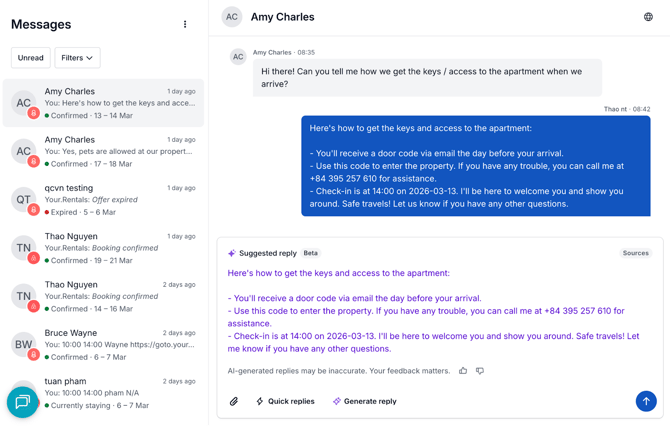
- Click Generate AI Reply at the bottom of the conversation.
The suggested reply appears in the Suggested reply panel below the conversation.
You can:
- Read the suggestion
- Edit the message if needed
- Personalize the reply
- Send it as a normal message
How to edit a reply
Generating a draft reply does not commit you to sending it. You are in full control before anything is sent:
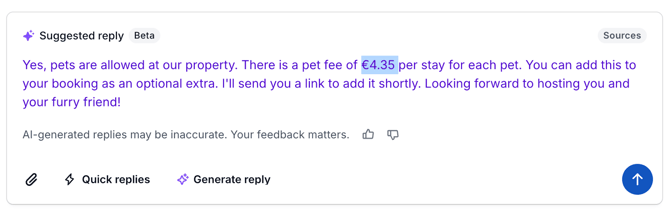
- Read the draft and check that the details (dates, property name, policies) are accurate.
- Click anywhere in the Suggested reply text to place your cursor — then type to add, select and delete to remove, or rewrite as needed. Shorten, rewrite, or personalise as needed.
- When you are satisfied, press Send as you normally would.
Tips for Better AI Suggestions
The quality of AI suggestions depends on the information available in Your.Rentals.
To improve reply quality:
- Keep your listing details up to date (property description, house rules, check-in/out times, cancellation policy)
- Add optional extras and special conditions so the AI can reference them when guests ask about them
- Make sure booking and inquiry details are complete
For replies mentioning dates or availability, always verify the information manually since the AI does not read your calendar view.
Frequently Asked Questions
What language will the reply be written in?
The AI determines the language based on the conversation.
- If you have already replied in the conversation, the AI matches the language you used.
- If you have not replied yet, the AI uses your account language.
Is my conversation data private?
The AI processes conversation and listing data within Your.Rentals to generate reply suggestions. This information is used only to create reply suggestions inside the platform.
Which channels are supported?
AI Messages works across your connected sales channels inside Your.Rentals, including Airbnb, Booking.com, direct bookings, and other integrated channels.
What should I do if the reply seems wrong or off-topic?
Always review suggestions before sending them.
If something looks incorrect or incomplete:
- Edit the message before sending
- Verify important details such as dates, pricing, and policies
Because this feature is currently in beta, your feedback helps improve reply quality.
How do I give feedback on a suggestion?
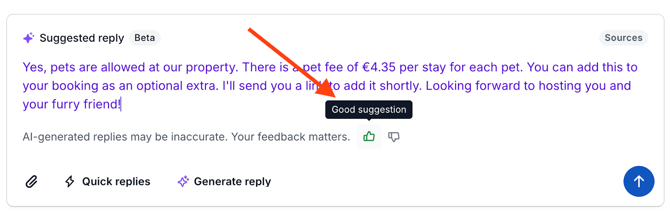
Use the thumbs up 👍 or thumbs down 👎 icons at the bottom of the Suggested reply panel, next to the notice:
“AI-generated replies may be inaccurate.”
Your feedback helps improve suggestion quality during the beta.